Skip to content
37
MCP tools
8
workspace views
19280
local API port
4
persistent docks
Terminal multiplexer for Agentic coding

LAYMUX

Keyboard-first terminal IDE for Windows + WSL, Claude Code, Codex CLI, Grok, and CJK/IME.

Run WSL, PowerShell, Claude Code, Codex, and Grok side by side in a ratio grid. IME stays glued to the cell. Agents drive the IDE itself. The same workspace opens on Android over an E2E remote.
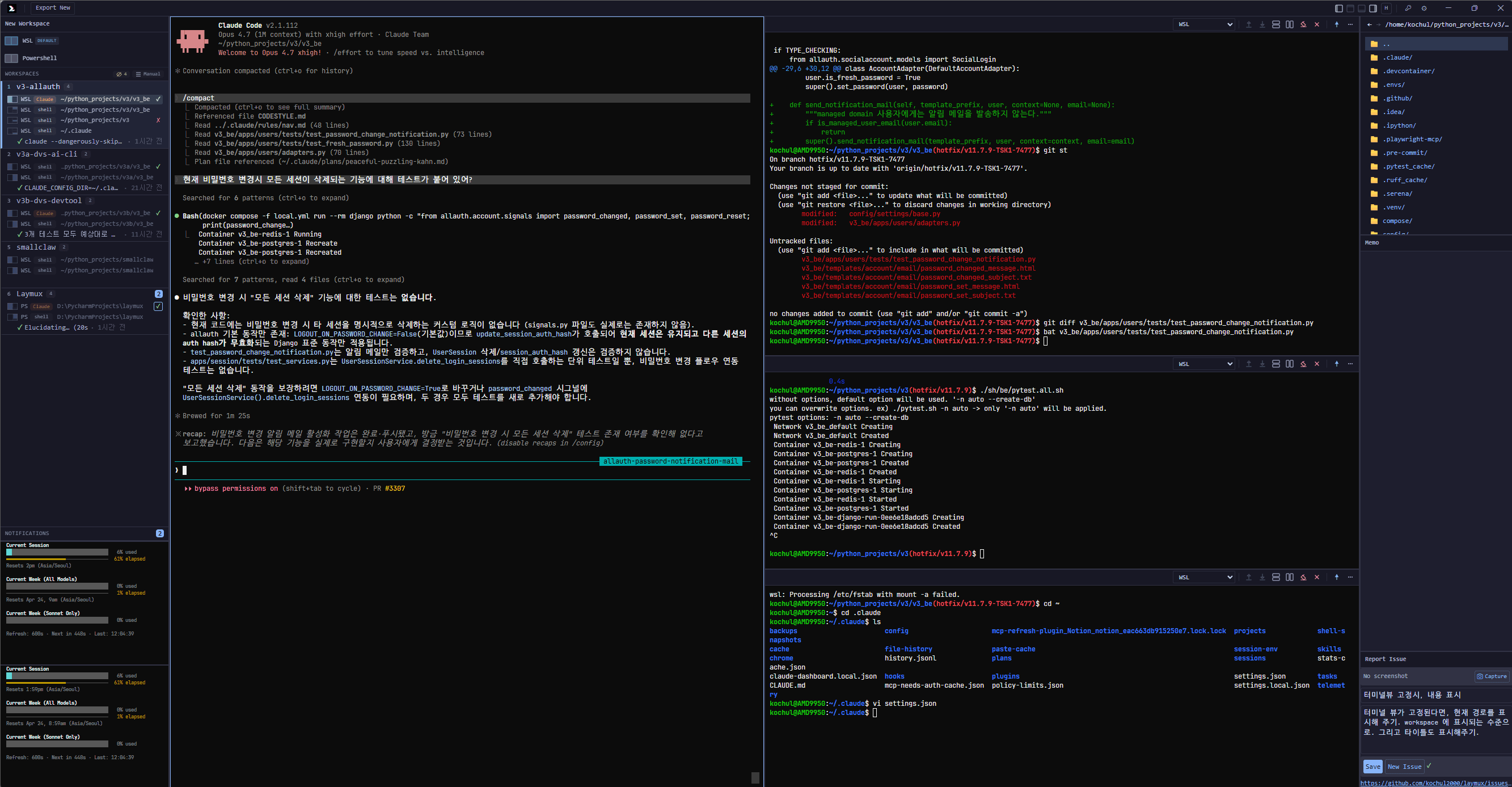
Laymux multi-pane terminal workspace
What's new

Remote the grid. Let agents drive it.

Android
The same workspace on your phone
Pair with QR or paste, unlock with biometrics, and keep an E2E session on the desktop grid.
Composer
Talk to Claude, Codex, and Grok from Android
Remote composer, file attach, and an in-page file explorer on the remote display.
MCP
37 tools, plus subscribe-able state
Agents open panes, read output, take screenshots, and subscribe to workspace:// instead of polling.
Files
Click a path, open it in Laymux
Markdown, PDF, image, diff, and source — from the terminal, File Explorer, or MCP.
Why

Windows terminal work has different constraints. Laymux treats them as core.

WSL context, long-running AI agents, and CJK input methods all stress normal terminal UIs. Laymux is designed around those constraints from the start — then exposes the same grid to agents and to a phone.

Built for Windows + WSL
Ratio-based free-form grid. WSL-distro-aware profiles. Per-terminal CWD and scrollback restore. No tab juggling.
Claude Code, Codex, and Grok are first-class
Laymux knows when they are thinking, idle, or finished, and surfaces that state in the workspace selector and notifications.
Stable CJK / IME input
A shadow cursor keeps Hangul, Japanese, and Chinese composition glued to the real xterm.js cell during TUI repaints.
Android remote client
QR or paste pairing, biometric unlock, E2E session. Drive the desktop grid from the phone, including composer input.
File Explorer and in-app viewer
Open paths from the terminal or MCP. Markdown, PDF, image, diff, logs, and source render in one viewer.
Agents operate the IDE
REST 19280, MCP, and lx in every pane. Laymux opens the path. It does not run the loop. Agents split, write, screenshot, and notify when they choose to.
Stance

Stay a terminal. Open the path. Leave agent work to the agent.

Terminal
Faithful to what a terminal already is
Panes, PTY, directory, profiles, scrollback. Laymux does not invent a second place to live besides the shell. It keeps the multiplexer honest.
Agents
Agent work stays with the agent
Laymux does not orchestrate Claude, Codex, or Grok. It only opens a path — MCP, lx, neighbor write — so they can talk to each other and to the grid. The loop is theirs.
Simple
Simple, and every surface is yours
Defaults stay quiet. Settings, profiles, layouts, docks, keybindings, color schemes — customize the whole shell, Windows Terminal style.
Directory
The working directory is the unit
Each pane's real CWD is source of truth. SyncGroup propagates it across terminals when you want that, and stays silent when you don't.
How it works

Keep terminals, agents, and workspace state in one focused surface.

  1. 01

    Create a workspace from a terminal-first pane layout, with four docks that survive workspace switches.

  2. 02

    Treat each pane's CWD as the unit. SyncGroup can propagate directory and git branch; set it to none to opt out.

  3. 03

    Open a path for agents — REST + MCP + lx — without taking over their orchestration.

Remote

The desktop owns the grid. The phone is a thin, encrypted window into it.

The Android app is a signed hybrid client. Pairing, biometrics, and transport live in native code. The remote UI itself is served by the PC, so you do not get a second, drifting copy of the IDE.

Android APK
Pair once
Scan a 5-minute QR, or paste the pairing value. Multi-PC vault on the phone.
E2E session
Direction-specific keys. Relay sees ciphertext. Tailscale Direct when a verified route exists.
Composer on glass
Type to the focused agent from Android. Attach files. Browse the host with the overlay explorer.
Automation

Let agents operate the IDE, not just the shell.

Laymux does not orchestrate those agents. A local allowlisted API opens the path: panes, commands, output, screenshots, files, notifications. Release MCP exposes 37 tools; Resources push workspace and terminal state without polling. The loop stays with Claude, Codex, and Grok.

Tauri v2 desktop shell
Four persistent docks
CWD + branch sync
Native task notifications
REST API + MCP 37
lx CLI in every pane
local automation
curl http://localhost:19280/api/v1/workspaces
curl -X POST http://localhost:19280/api/v1/terminals/{id}/write \
  -H "Content-Type: application/json" \
  -d '{"input":"npm test\n"}'

// Claude / Codex / Grok MCP
http://localhost:19280/mcp

// Resources
workspace://active

Windows, Linux, and Android. Same release.

GitHub ships the desktop installers and the Android APK together. The homepage always points at the latest tag.

Windows
NSIS installer for Windows 10/11 + WSL.
Android
APK, same version as desktop. Pair from Remote Access on the PC.
Linux
deb, rpm, and AppImage. WebKitGTK on the desktop shell.
FAQ

Built around the terminal workflows normal IDE shells miss.